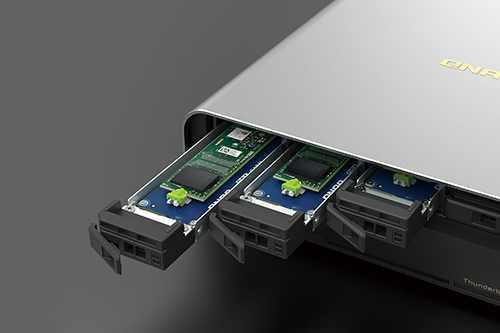
All-flash NASbook supporting E1.S/M.2 NVMe SSDs – a perfect companion for video production
Compared to large rackmount all-flash array storage, the TBS-h574TX all-flash NASbook provides five SSD slots in a compact and portable design. Its high-speed read/write performance is specifically tailored for video editors and VFX professionals. Equipped with QNAP enterprise-grade E1.S SSDs, users benefit from a robust combination of performance, stability, and data security. The TBS-h574TX seamlessly works with USB DAS (such as TR-004) for efficient file backup and archiving, that keeps it in optimal condition for a seamless flow into every creative challenge.
Option 1: Configured with five 1.92 TB E1.S SSDs
Total usable storage per system
up to 9.6 TB
Option 2: Configured with five 3.84 TB E1.S SSDs
Total usable storage per system
up to 19.2 TB
Maximize uptime with hot-swappable E1.S / M.2 SSD
Frontline video production teams are sometimes at risk of project interruptions due to unexpected SSD failures in storage devices. The TBS-h574TX supports hot-swappable SSDs, along with conditional automatic RAID replacement with spares. If an SSD enters a critical state, the system automatically moves data from the affected drive to a spare in the RAID group, seamlessly integrating it into the existing RAID without the need for RAID rebuilding. This significantly reduces the risk of data loss.
Hot-swappable E1.S SSD: Future-proof storage
The TBS-h574TX supports hot-swappable E1.S SSDs, providing reliable high-density data transfer with optimal cooling efficiency and making it perfect for accommodating future storage needs.
Hot-swappable M.2 SSD: Agile innovation
An optional E1.S to M.2 adapter allows M.2 SSDs to become hot-swappable. This enables replacing SSDs without downtime and enhances system maintenance flexibility.
QNAP Enterprise E1.S SSDs: Performance, Reliability, Security
QNAP-certified enterprise E1.S SSDs are built for high-density data access and include multiple layers of data protection, ensuring stable, high-speed performance for creative professionals.
Seamlessly compatibility
Tested for reliability and seamless integration with QNAP NAS for peak performance.
High-speed and low latency
Up to 70,000 IOPS (4K random write) boosts the efficiency of VFX editing and small file access.
Long-lasting durability
Designed for 24/7 high-intensity read/write workloads with extended lifespan.
5-year warranty
QNAP E1.S SSDs backed by a 5-year limited warranty for long-term reliability and peace of mind.
The warranty is void if the SSD's TBW exceeds the specified product limit.
Power loss protection
Supports PLP (Power Loss Protection) to prevent data loss or corruption during unexpected power outages.
Self-encryption
TCG Opal SED hardware encryption protects confidential files from unauthorized access.
High-performance SSDs. Effective heat dissipation.
Designed with an excellent cooling system, the TBS-h574TX is equipped with dual fans and supports SSD heatsinks (heatsinks sold separately) to effectively enhance heat dissipation during intensive workloads, allowing creators to confidently enjoy the ultimate performance of SSD.
M.2 / E1.S SSD may overheat and suffer decreased performance during high-speed operations. It is recommended to purchase and install heatsinks on SSD controllers to enhance heat dissipation for stable high-speed transfer performance.
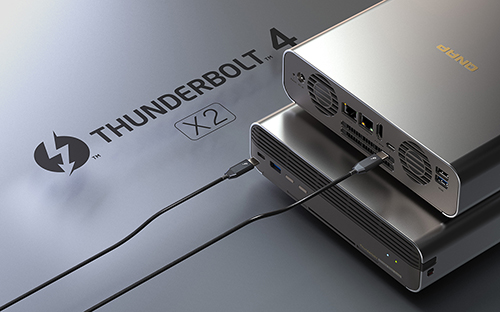
Thunderbolt™ 4 direct connection to workstations for higher productivity
The TBS-h574TX has two Thunderbolt™ 4 ports for high-speed data transfer (up to 20Gbps bandwidth). Mac® (including M1 and M2 chip models) or Windows® workstations can directly connect to the TBS-h574TX for fast and smooth real-time video editing, allowing for the transfer of a 1TB 4K video just in 11 minutes.
Notes:
- QNAP Thunderbolt NAS adopts Thunderbolt Networking for peer-to-peer connection, up to 20Gbps.
- Mac® system requirement: macOS 13.5 (or later)
- Connect the TBS-h574TX to your Mac® or Windows® PC with Thunderbolt™ 4 / Thunderbolt™ 3 cables and your connected devices with the Thunderbolt icon
Transmission efficiency
| TBS-h574TX (1 x Direct connected client) |
Write
1393 MB/s
|
Read
1410 MB/s
|
Tested in QNAP Labs. Figures may vary by environment.
NAS: TBS-h574TX-i5UC-05S02
CPU: Intel® Core™ i5-1235U 10-core(2P+8E), up to 4.4GHz
OS: QuTS hero h5.2.3.2970 Build 20241203
Volume Type: 5 x QNAP 3.84TB E1.S NVMe PCIe Gen4 x4 SSD, RAID 5
Client PC:PC 1 – Intel i9-12900E, 64G RAM, 2 x Thunderbolt 4, Windows server 2019
Diverse I/O, greater possibilities.

2.5GbE and 10GbE ports | Productive teamwork
The 2.5GbE and 10GbE ports can be used with a network switch to add more connected devices to the TBS-h574TX for collaboration, significantly reducing file transfer times across devices.

USB 3.2 Gen 2 ports | Faster file import/export
Creators and editors can easily import materials from external storage devices to the TBS-h574TX via two USB 3.2 Gen 2 (10Gbps) ports and one USB 2.0 port during pre-/post-production.

USB ports | Easier storage expansion
The TBS-h574TX capacity is scalable by connecting QNAP USB DAS TR-004 or USB JBOD TL-D800C to archive massive number of video files for ever-growing storage and backup needs.
Compact, aesthetic, yet unmatched performance
The TBS-h574TX provides content creators the perfect combination of stylish design and performance. With its metal-finish case, it delivers optimized cooling performance. The set-top design makes the TBS-h574TX space-saving – smaller than A4 paper and with only 2.54 liters in volume – ideal for small-scale studios or video production teams looking for a portable solution.
Next-gen Intel® Core™ processors with hybrid architecture for multitasking potential
The TBS-h574TX adopts Intel® Core™ hybrid-architecture processor with P-core (Performance-core) and E-core (Efficient-core) performance. Multi-core and multi-thread advantages enable higher multitasking performance with lower CPU workloads and resource consumption, empowering creators with higher productivity.
Processor
Intel® Core™ i5-1235U 10-core (2P+8E) and 12-thread processor, up to 4.4 GHz
Memory
Built-in 16GB DDR4 memory
GPU
Built-in Intel® Iris® Xe Graphics accelerate video processing and graphical computing
Encryption Engine
Features Intel® AES-NI 256 hardware-accelerated encryption to boost system performance while securing sensitive data
Recommended video production scenarios
| Pre-production |
Post-production |
Remote collaboration |
|
Pre-production: Best video file management solution for DIT – raw footage on-site editing and powerful video transcoding
DIT (Digital Imaging Technician) is the keyman to take responsibility of video file management on shooting site in a frontline video production team.
DIT can quickly import large raw footage from camera SD cards to the TBS-h574TX through USB 3.2 Gen 2 (10Gbps) ports and proceed with video transcoding on the NASbook. In addition to saving RAW files, DIT can easily share small files with remote teams for instant discussion and confirmation, or save files to external hard drives or cloud storage.
The TBS-h574TX comes with a built-in HDMI™ output, allowing on-site personnel to immediately play raw footage from the NASbook on a large screen. The team can also complete the rough cut on-site using Thunderbolt™ 4, significantly reducing the post-production team’s workload.
Benefits for a pre-production team:
- Fast file import from SD cards to NASbook
- Store small files to myQNAPcloud Storage
- Remote access and sharing video files
- High-resolution video display using HDMI™ output
- Rough cut on-site using Thunderbolt™ 4
|
Post-production: Productive team collaboration
NAS is way more collaborative than DAS. The TBS-h574TX provides Thunderbolt™ 4 and 10GbE connectivity that allow the post-production team to edit video files directly from the NASbook, without waiting for files to move from drive to drive, computer to computer.
Once the post-production team finishes current video editing projects on the TBS-h574TX, they can save the final files to a USB DAS (such as TR-004) to free up the NASbook’s storage space for the next project!
Benefits for a post-production team:
- Directly connect the NASbook to Mac® via Thunderbolt™ 4
- Directly connect the NASbook to Windows® workstations through 10GbE and 2.5GbE connectivity
- File storage and backup by connecting a DAS through the high-speed UBS 3.2 Gen 2 ports
|
Remote collaboration: Hot-swappable M.2 SSDs facilitate file sharing for collaboration and delivery
Due to the difficulty of sharing large media files over networks, remote teams often resort to physically exchanging files by using external hard drives. Now the TBS-h574TX also offers a portable file exchanging/delivery solution.
You can implement a TBS-h574TX for each of the remote work teams, configuring three M.2 SSDs in RAID 5, and the remaining two M.2 SSDs as single disk. The TBS-h574TX makes M.2 SSDs hot-swappable, allowing you to treat the two M.2 SSDs with single disk mode as portable external hard drives: simply remove SSDs from one NASbook and insert them to another NASbook for fast large-scale file transfer.
Benefits for remote teamwork:
- Hot-swappable feature enables physically transferring large media files
|
Ultimate visual experience with real-time video transcoding and 4K HDMI™ output
The TBS-h574TX features built-in Intel® Graphics that accelerates video transcoding and graphical computing for converting videos to different formats smoothly. You can also display videos from the TBS-h574TX to a large screen using HDMI™ (4K @30Hz) for capturing details and clearer quality.
Note: The TBS-h574TX provides hardware decoding, encoding and transcoding capabilities. However, playback quality may vary due to factors (including playback software, file formats, system usage, and available bandwidth). H.265 hardware transcoding requires installing CAYIN MediaSign Player with a Plus license.
Manage your video projects flexibly with myQNAPcloud Storage
Elevate your video production with the compact and powerful TBS-h574TX. During pre-production, you can save large RAW files (hot data) and handle video transcoding on the TBS-h574TX. In post-production you can store small files (cold data) to myQNAPcloud Storage for file archiving and backup, making it easier to remotely access, synchronize, and share files with cross-site team members.

QNAP is an official Adobe Partner for video and audio solutions
Build the best music server with Roon
Designed for music lovers, Roon Server identifies your entire music library stored on the TBS-h574TX, and consolidates it into Roon’s interconnected digital library. Experiencing smooth music streaming service, you just need to download Roon Server app from QNAP App Center and enable Roon music library on SSD storage devices with simple setting.
Leverage AI to predict NVMe SSD drive failure
Featuring AI-powered diagnostics technology, ULINK DA Drive Analyzer leverages historical usage data of millions of drives to intelligently predict drive failure. It supports NVMe SSD failure prediction*, allowing you to prepare in advance for drive failure before it occurs and ensure the safety of data stored on the TBS-h574TX.
ZFS-based QuTS hero operating system unleashes SSD performance, reliability and endurance
Self-healing | Ensure data integrity
ZFS uses end-to-end checksums to detect, correct, and protect against silent data corruption, ensuring the data integrity of media files.
QSAL (QNAP SSD Antiwear Leveling) | Enhance data protection
QNAP’s patented QSAL algorithm prevents simultaneous multi-SSD failures in an SSD RAID for greater data protection and system reliability.
SSD Extra Over-provisioning | Unleash SSD performance
Resolves SSD write performance degradation and write amplification. By configuring extra Over-provisioning for an SSD RAID, it improves random write performance and mitigates write amplification, thus extending SSD lifespans.
Power Failure Protection | Bolster data security
The QuTS hero operating system ensures that the TBS-h574TX can continue completing unfinished data writes after power outage followed by a power restoration, preventing data corruption while modifying data and without the need to wait for file system check.
Note: ZFS Inline Data Deduplication is disabled by default in the TBS-h574TX. Due to memory limitations, it is not recommended to enable this feature.
Extend hardware warranty up to 5 years
The TBS-h574TX is backed by a 3-year warranty at no additional cost. You can also purchase a warranty extension that extends your warranty coverage up to 5 years.